Why Overlay Widgets Get US Businesses Sued
In 2025, the FTC issued a $1,000,000 deceptive marketing penalty against overlay providers. Over 25% of ADA lawsuits specifically target sites with overlay toolbars. Here is why code-level auditing is the only legal defense.
| Compliance Capability | Rogabot Native Code Auditing | Superficial Overlay Widgets |
|---|---|---|
| Underlying DOM & HTML Remediation | ✅ 100% Code-Level Native Fixes | ❌ 0% Underlying Code Modified |
| ADA Title III Legal Defense Validity | ✅ Proven in Federal Court (WCAG AA) | ❌ Rejected by Judges (Treats widget as proof of knowledge) |
| Screen Reader Compatibility (NVDA/JAWS) | ✅ Full ARIA & Semantic Support | ❌ Often blocks or interferes with native assistive tech |
| Zero Installation Setup | ✅ 100% Zero-Setup (No code access needed) | ❌ Requires injecting external scripts |
| DOJ ADA Title II Rule & EAA Compliance | ✅ Meets strict public mandate standards | ❌ Explicitly ruled insufficient by regulators |
| Site Performance & PageSpeed Impact | ✅ 0KB Client-Side Runtime Bloat | ❌ Heavy JavaScript slows down page loads |

How Do You Know Your Website is Truly ADA Compliant?
Most business leaders and engineering teams assume their digital footprint is secure, until a demand letter arrives. 6 critical questions to assess your organization's legal and accessibility exposure:
Are you relying on an overlay widget or actual source code compliance?
Did you install an overlay toolbar, or did an auditor inspect your underlying DOM tree, contrast tokens, and screen reader announcements?
Do you possess an updated third-party compliance certificate?
If a plaintiff's law firm targets your site today, do you have independent, dated verification proving proactive, good-faith ADA compliance?
How often do marketing or engineering teams push site changes?
New promotions, landing pages, banners, or components deploy every week. Who verifies they did not introduce new WCAG regressions?
Have you ever navigated your checkout flow using only the keyboard Tab key?
Can a visitor navigate form fields, trigger dropdowns, and complete a checkout transaction without touching a mouse?
Are your downloadable PDFs and documents accessible (PDF/UA)?
Do your downloadable menus, annual reports, brochures, or policy disclosures meet PDF/UA ISO 14289 and WCAG requirements?
Who provides you with independent audits without conflicts of interest?
Is your auditor trying to sell you inflated development retainers, or are they an objective, unconflicted verification platform?
Comprehensive US Legal Protection
Digital accessibility is no longer optional for US enterprises. Rogabot provides automated verification against all major federal and state statutes.

US ADA Title III
Applies to all commercial websites, SaaS apps, and public businesses. Courts consistently enforce W3C WCAG 2.1/2.2 AA as the legal standard of accessibility under Title III.
DOJ ADA Title II Final Rule
Mandatory WCAG 2.1 AA compliance for state and local government digital services, public schools, and public universities with enforceable legal deadlines in 2027 and 2028.
California Unruh Civil Rights Act
Provides statutory minimum damages of $4,000 per violation plus mandatory attorney fees. California is the top jurisdiction for web accessibility lawsuits.
Colorado HB 21-1110
Enforces strict digital accessibility standards with statutory civil fines of $3,500 per violation for non-compliant public entities and contractors.
New York Human Rights Law
New York federal and state courts represent over 60% of all annual US web accessibility filings, with heavy settlement awards for inaccessible e-commerce checkout flows.
Section 508 & VPAT Generation
Federal government contractors and software vendors must maintain updated Voluntary Product Accessibility Templates (VPAT) to bid on government and enterprise RFPs.
Everything You Need for WCAG Compliance
Built by engineers for modern software teams, product managers, and compliance officers who need automated peace of mind.

Multi-Page Deep Crawler
Scans entire domains, hidden query parameters, single-page application routes, authenticated dashboards, and dynamic drawer states.
PR-Ready Code Remediation
Instead of vague compliance scores, Rogabot outputs exact HTML, CSS, and ARIA diffs that developers can copy and commit in minutes.
Zero Installation Required
No plugins, SDKs, or repository access needed. We audit your public URLs and dynamic routes directly using headless browser rendering.
Executive PDF Compliance Reports
Generate formal compliance certificates, audit logs, and risk assessments for your legal counsel, insurance underwriters, and enterprise buyers.
Scheduled Retainer Monitoring
Retainer clients receive scheduled audits and instant violation alerts whenever content updates or plugin changes introduce new errors.
PDF & Document Accessibility Auditing
Audit downloadable PDF files, statements, invoices, and manuals against PDF/UA (ISO 14289) and WCAG 2.2 AA standards for tag tree, reading order, and form accessibility.
Full WCAG 2.2 Rule Coverage
Engineered with all 9 new WCAG 2.2 success criteria, including Focus Appearance (2.4.11), Target Size (2.5.8), Consistent Help (3.2.6), and Redundant Entry (3.3.7).
Calculate Your ADA Lawsuit Exposure & ROI
See your estimated financial exposure from predatory demand letters versus the cost of continuous automated protection.
Illustrative estimate based on public litigation trends, not an audit of your site. Request an audit and we will email you your actual results.
Estimated Legal Settlement Risk
Average legal defense + plaintiff settlement in your state
Rogabot Annual SaaS
Net Protected Capital
Explore the 4 Pillars of WCAG 2.2 Compliance
Learn what our automated auditing engine tests across the four essential POUR principles.
Perceivable: Information & UI Must Be Presentable to All Senses
Users must be able to comprehend the information being depicted.
- 1.1.1 Non-Text Content - Meaningful alt text on all informative images; aria-hidden on decorative icons.
- 1.4.3 Minimum Color Contrast - At least 4.5:1 for regular body text; 3:1 for large display text and UI components.
- 1.4.10 Reflow - Content reflows cleanly at 400% zoom (320px width) with zero horizontal scroll.
- 1.4.11 Non-Text Contrast - Visual boundaries of active inputs and icons meet 3:1 contrast against adjacent backgrounds.
Live WCAG Barrier & Developer Remediation Inspector
Inspect authentic scan violations identified by our automated auditing engine, explore the raw DOM error, and examine PR-ready native code fixes that permanently eliminate legal exposure.
Illustrative examples of issues our audits find. Your own results are emailed to you after we review your site.
Interactive Action Buttons Missing Accessible Names
Icon buttons and interactive controls without inner text or aria-label are completely inaccessible to screen reader users, who hear only "button" with no indication of its action.
<!-- Mobile menu button missing accessible label -->
<button class="mobile-menu-btn">
 <svg width="24" height="24">
 <line x1="3" y1="6" x2="21" y2="6"></line>
 </svg>
</button><!-- Remediated with aria-label & aria-hidden icon -->
<button class="mobile-menu-btn"
aria-label="Open navigation menu"
aria-expanded="false">
<svg width="24" height="24" aria-hidden="true">
<line x1="3" y1="6" x2="21" y2="6"></line>
</svg>
</button>Sample Audit Reports: Remediation vs. Certified Standing
See firsthand the difference between an initial audit report identifying critical code regressions with line-by-line developer diffs, and an official certified report providing full good-faith legal defense.
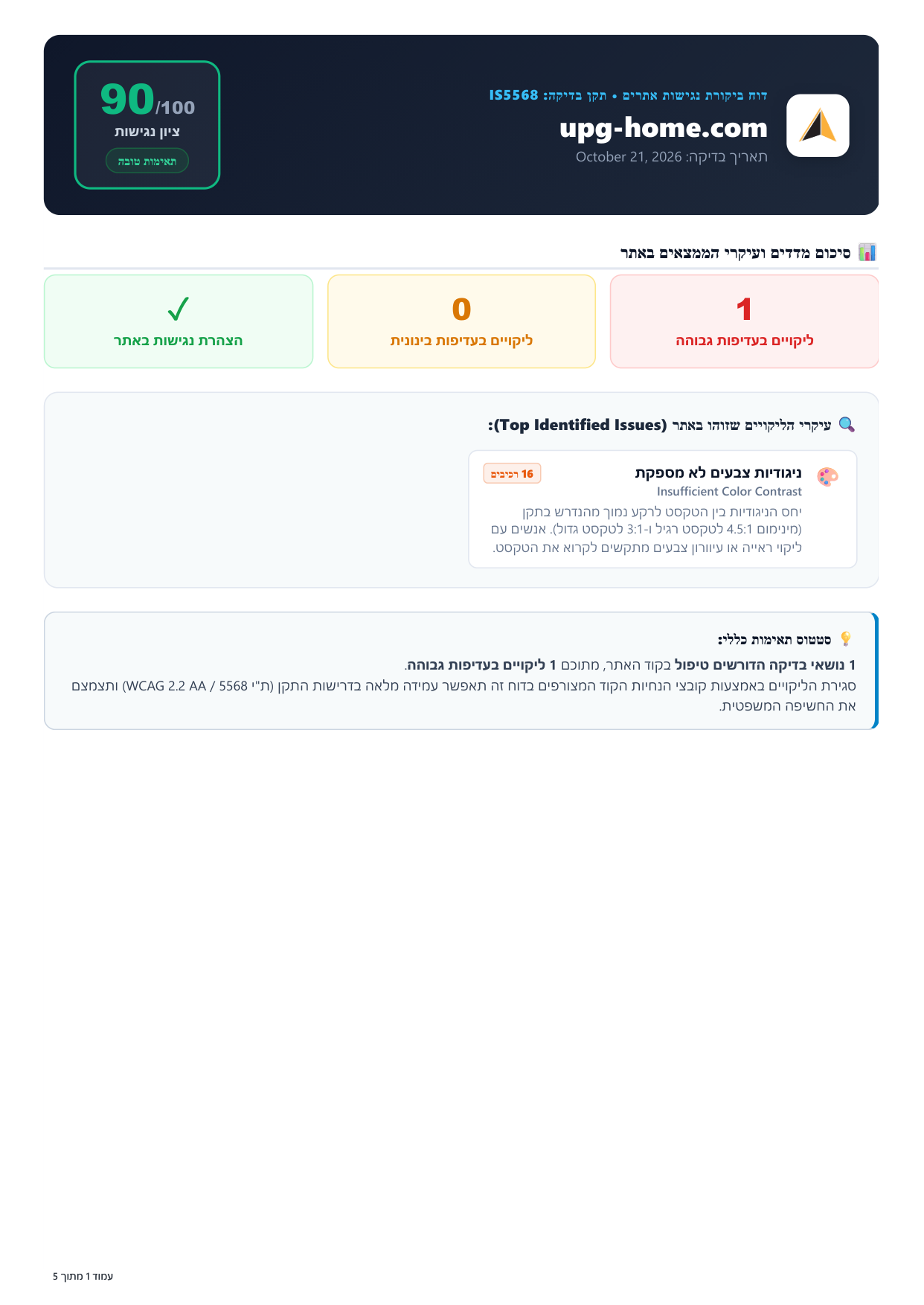
Initial Crawl Audit Report (upg-home.com)
Review an actual initial audit report identifying high-priority code violations (such as color contrast and language attributes) with line-by-line developer code diffs ready to commit.
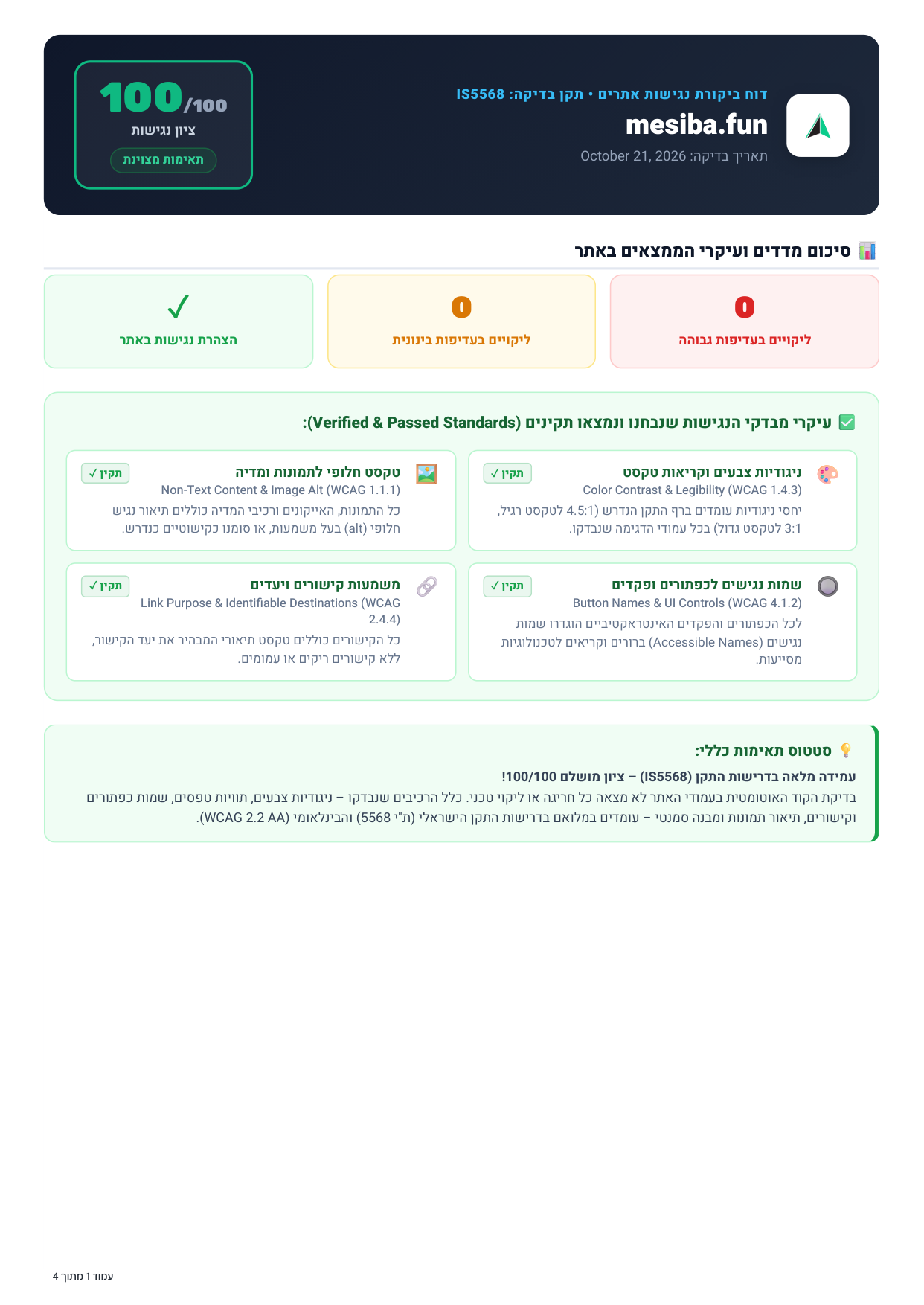
Passed Certified Compliance Report (mesiba.fun)
Review an authentic post-remediation report demonstrating 100/100 compliance with WCAG 2.2 AA and ADA Title III requirements, backed by an official dated certificate for courtroom defense.
Frequently Asked Questions
Everything you need to know about website accessibility auditing, ADA Title III compliance, and Rogabot.
No. Rogabot does not run an instant scan. You leave your details, we audit your website, and we email you the full report within 3 business days (often same-day).
Overlay widgets only alter surface CSS (like contrast or font size) via a client-side toolbar. They do not fix broken underlying DOM structures, missing form labels, or broken keyboard navigation. Federal courts and the DOJ have repeatedly ruled that overlay widgets do not satisfy ADA Title III requirements. In 2025, the FTC penalized major overlay vendors for deceptive marketing. Rogabot fixes your actual source code.
WCAG 2.2 is the latest official W3C standard. It introduces 9 new success criteria focused on mobile touch targets (2.5.8), focus appearance visibility (2.4.11), cognitive load reduction with accessible authentication (3.3.8), and preventing redundant entry (3.3.7). Rogabot audits against both WCAG 2.1 and 2.2 AA.
Rogabot uses full headless browser rendering to crawl your live website, execute client-side JavaScript, test responsive layouts, and evaluate interactive components. You do not need to install plugins, grant repo access, or configure any servers.
Yes. Rogabot uses full browser rendering to execute JavaScript, simulate keyboard tab sequences, open modals and flyouts, and inspect dynamic single-page applications just as a real user or assistive device would.
You get one-click downloadable PDF Executive Compliance Reports containing your domain health scores, timestamped audit logs, WCAG 2.2 AA checklists, and a ready-to-publish Accessibility Statement that demonstrates proactive compliance to legal counsel and auditors.